Product Design, Information Architecture, Content Strategy
AI Guidebook
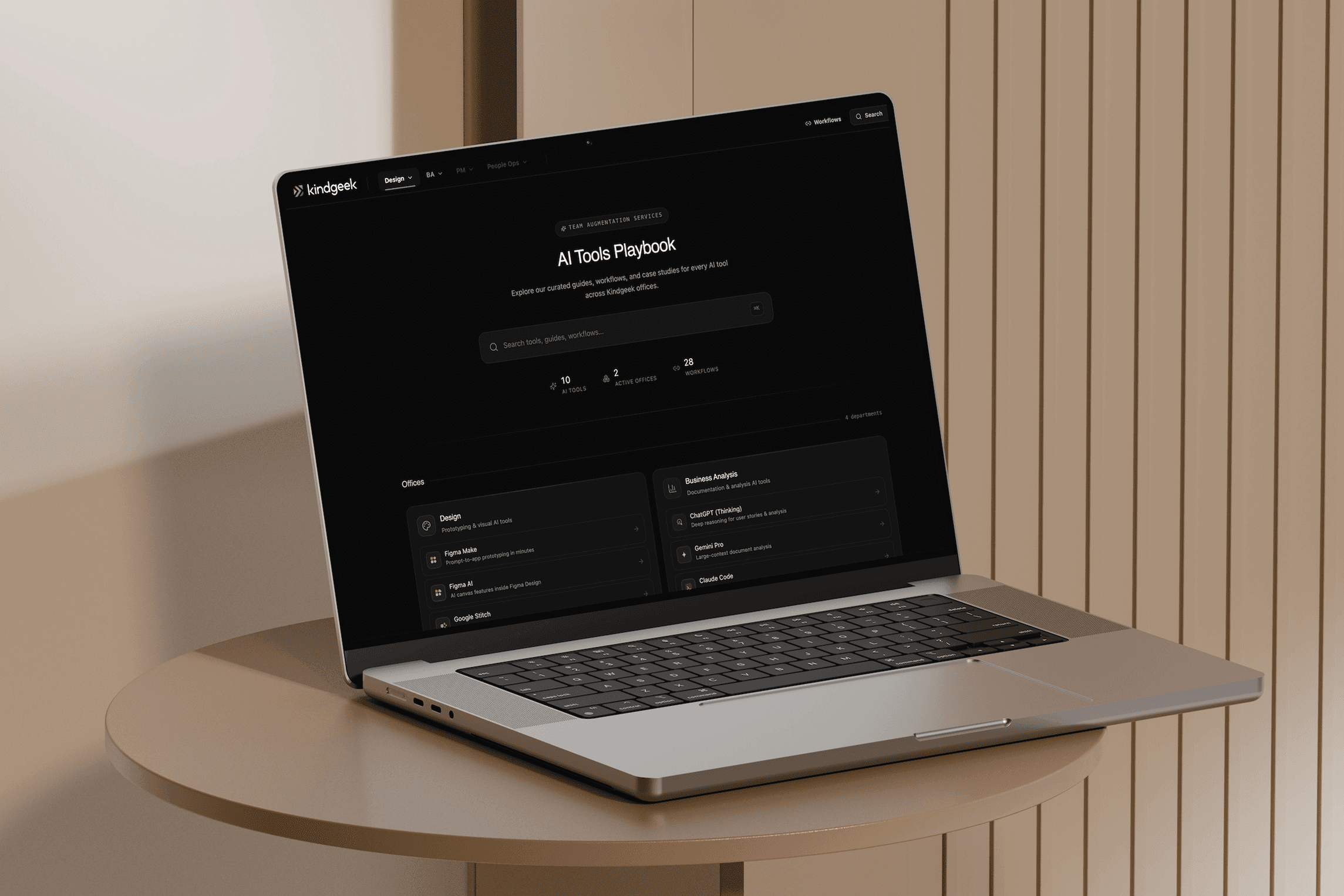
Internal playbook for ten AI tools across four offices, with twenty-eight cross-tool workflows.
Industry
Internal Tooling, AI Enablement, Knowledge Management
Services Provided
Product Design, Information Architecture, Content Strategy
Duration
6 weeks
Deliverables
Site Map
Content Model
Design System
Interactive Prototype
Workflow Matrix
Published Website
Site Map
Content Model
Single page
Design System
Single page
Interactive Prototype
Single page
Workflow Matrix
Single page
Published Website
Single page
Site Map
Content Model
Design System
Interactive Prototype
Workflow Matrix
Published Website
About the Project
About the Project
Kindgeek had ten AI tools in active rotation across four offices: Design, BA, PM, and People Ops. Tribal knowledge lived in Slack threads. New hires learned by asking. Leadership saw uneven adoption but had no way to fix it without a single shared reference. The brief was to build that reference and prove people would actually use it.
About the Project
Kindgeek had ten AI tools in active rotation across four offices: Design, BA, PM, and People Ops. Tribal knowledge lived in Slack threads. New hires learned by asking. Leadership saw uneven adoption but had no way to fix it without a single shared reference. The brief was to build that reference and prove people would actually use it.

Challenge
Challenge
Ten tools, four offices, zero shared definition of what "good" looks like for any of them.
Tribal knowledge lived in Slack threads and one-off Notion pages. Senior designers used Figma Make daily, others did not know it existed.
Cross-tool workflows (Figma Make + Claude, ChatGPT + Gemini for research) were the highest-leverage use cases, but had no documented patterns.
Challenge
Ten tools, four offices, zero shared definition of what "good" looks like for any of them.
Tribal knowledge lived in Slack threads and one-off Notion pages. Senior designers used Figma Make daily, others did not know it existed.
Cross-tool workflows (Figma Make + Claude, ChatGPT + Gemini for research) were the highest-leverage use cases, but had no documented patterns.
Focus
Make it the kind of thing people open by choice. Anything mandatory gets ignored within a quarter, so I built for curiosity. Dense pages people can scan in 30 seconds, fast search, and a structure that matches how the team thinks about itself (by office, not by tool).
Make it the kind of thing people open by choice. Anything mandatory gets ignored within a quarter, so I built for curiosity. Dense pages people can scan in 30 seconds, fast search, and a structure that matches how the team thinks about itself (by office, not by tool).
Solution
Solution
A dark editorial Library with two ideas that earned their place. First, every tool gets its own brand colour, so you spot ChatGPT vs. Claude in any list before you read a word. Second, the Merge page treats "tool A plus tool B" as a first-class object with steps, pitfalls, and example cases. Twenty-eight cross-tool workflows live as their own URLs.
Solution
A dark editorial Library with two ideas that earned their place. First, every tool gets its own brand colour, so you spot ChatGPT vs. Claude in any list before you read a word. Second, the Merge page treats "tool A plus tool B" as a first-class object with steps, pitfalls, and example cases. Twenty-eight cross-tool workflows live as their own URLs.
Approach
Approach
As this is an internal product, the process was somekind of chaotic. Still, I tent to fit it into Design Thinking Methodology:
Empathise
Two workshops per office. I asked people to show me their last real task, not their ideal workflow. The diff between the two was the design opportunity.
Define
Mapped tools, use cases, and combinations into a content model. Set rules for what counts as a workflow worth documenting (used by 2+ people, repeatable, has at least one pitfall).
Ideate
Tested three IA options: by tool, by job, by office. Office-first won because it matched how people self-identify and find peers.
Prototype
Built the working SPA in Figma Make with a full shadcn/Tailwind base. Static content fed from typed TS files so structure stays consistent across 12,000 lines.
Test
Five usability sessions with people from each office. Adjusted the global search behaviour and the Merge selector after watching people skip it on first visit.
Approach
As this is an internal product, the process was somekind of chaotic. Still, I tent to fit it into Design Thinking Methodology:
Empathise
Two workshops per office. I asked people to show me their last real task, not their ideal workflow. The diff between the two was the design opportunity.
Define
Mapped tools, use cases, and combinations into a content model. Set rules for what counts as a workflow worth documenting (used by 2+ people, repeatable, has at least one pitfall).
Ideate
Tested three IA options: by tool, by job, by office. Office-first won because it matched how people self-identify and find peers.
Prototype
Built the working SPA in Figma Make with a full shadcn/Tailwind base. Static content fed from typed TS files so structure stays consistent across 12,000 lines.
Test
Five usability sessions with people from each office. Adjusted the global search behaviour and the Merge selector after watching people skip it on first visit.
Value Delivered
Value Delivered
The Guidebook replaced three Notion spaces, a graveyard of Slack pinned messages, and the "ask the senior" loop new hires used to depend on. Office leads finally have a place to publish workflows that survive past the next reorg. The unexpected win: senior designers started using the Merge page themselves, mostly to remember how they used to combine tools before they got too busy to think about it.
Value Delivered
The Guidebook replaced three Notion spaces, a graveyard of Slack pinned messages, and the "ask the senior" loop new hires used to depend on. Office leads finally have a place to publish workflows that survive past the next reorg. The unexpected win: senior designers started using the Merge page themselves, mostly to remember how they used to combine tools before they got too busy to think about it.
28 cross-tool workflows
documented as standalone pages
10 tool deep dives
with case studies, limitations, and references
4 office hubs
each with its own accent colour and personality
+42 internal NPS
from 18 testers
28 cross-tool workflows
documented as standalone pages
10 tool deep dives
with case studies, limitations, and references
4 office hubs
each with its own accent colour and personality
+42 internal NPS
from 18 testers
Features
Per-office hubs
Each office (Design, BA, PM, People Ops) gets its own accent colour, dropdown menu, and landing page. Navigation matches how people identify themselves at work. New hires find their team's tools in one click.
Imagine one team having a single worker obsessed with manual data entry, repetitive tasks, and endless time-consuming researches. He also has an excellent eye for details, loves deadlines, and is determined to lighten your load.
The Merge Tool
Pick any two tools and get a recipe: steps, pitfalls, what works, what doesn't, real example cases. 21 combos currently mapped. Cross-tool workflows stop being tribal knowledge. The thing senior designers used to explain in DMs lives on a page now.
Suddenly, all the other employees can finally fully focus on building strategies, unleashing creativity, improving results, and ensuring business growth, without being scattered into endless small tasks.
Sticky sidebar with scroll-spy
Each deep page keeps the table of contents in sight and highlights the section you're reading. Dense pages stay scannable. Readers don't get lost in 2000-word tool deep-dives.
Twenty-eight workflows as standalone URLs
Each cross-tool recipe is its own page, shareable, linkable. You Slack someone a single link instead of typing the explanation for the seventh time.


View Latest Projects

Book a Free Consultation
Get expert guidance to align your product vision and make confident design decisions. Together, we’ll create practical solutions that drive measurable results for your product, team, and business.
Book a Free Consultation
Get expert guidance to align your product vision and make confident design decisions. Together, we’ll create practical solutions that drive measurable results for your product, team, and business.